



iceDQ for Power BI Testing
Deliver Power BI reports your business can trust
iceDQ brings automated data quality assurance directly into your Power BI development lifecycle. Test and certify your semantic models, datasets, dashboards, and reports before they reach production - so your business always operates on reliable, validated insights.
Trusted by data teams at Fortune 500 enterprises
















What happens when Power BI reports go untested
Bad data in reports leads to bad decisions. Manual testing is slow, inconsistent, and impossible to scale across hundreds of reports.
Inaccurate KPIs
Wrong totals, broken measures, or stale data silently erode trust in your dashboards.

Manual Testing Bottleneck
QA teams spend days spot-checking reports row by row - slowing every release cycle.

Compliance Risk
Unvalidated reports used for regulatory submissions can trigger audit failures and penalties.

Lost Stakeholder Trust
Once executives see wrong numbers, they stop trusting all reports - even the accurate ones.
Test Power BI Reports and Dashboards in iceDQ
iceDQ enables end-to-end validation of embedded Power BI reports and dashboards, ensuring that visualizations accurately reflect the underlying data.
- Embed Power BI reports and dashboards: Securely connect and embed Power BI reports within iceDQ to enable automated validation of visual elements and data outputs.
- Select the subreport for testing: Choose the specific page, tab, or visual within the embedded report that you want to validate.
- Apply dynamic filters: Configure parameter-driven filters to replicate real user scenarios and validate filtered report outputs.
- Apply data checks on report elements: Define and execute data quality checks on tables, charts, KPIs, and other report elements to ensure accuracy and consistency.
Test Power BI Semantic Model in iceDQ
iceDQ enables direct validation of the Power BI semantic layer, ensuring that measures, relationships, and model-level logic produce accurate and reliable results.
- Connect to the semantic layer: Establish a secure connection to the Power BI semantic model to access tables, relationships, measures, and calculated columns.
- Use DAX queries to select and filter data: Leverage DAX queries to extract, filter, and shape semantic model data for targeted validation scenarios.
- Apply data checks on semantic data elements: Define and execute data quality checks on measures, calculated fields, hierarchies, and other semantic elements to ensure correctness.
Create Data Reconciliation Rules in iceDQ
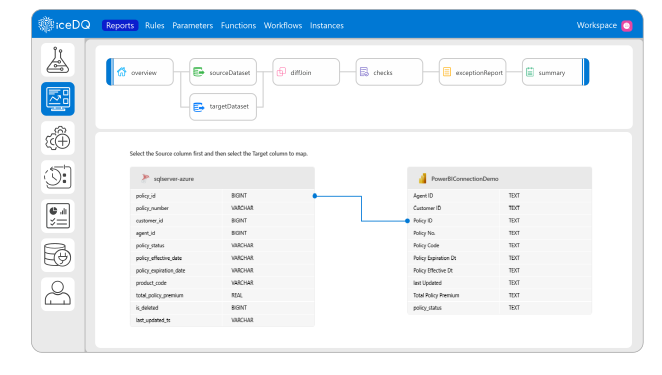
iceDQ enables flexible reconciliation across multiple data sources and reporting layers, ensuring that values remain consistent from raw data to semantic models and final reports.
- Semantic data model vs. Database: Compare measures, calculated fields, and model-level outputs against the underlying database tables to validate transformations and business logic.
- Report vs. Report: Reconcile values between two reports - across environments, versions, or visualization layers - to ensure consistency in KPIs and displayed metrics.
- Compare data values at row and column level: Perform granular comparisons of row-level records and column-level aggregates to detect mismatches or calculation discrepancies.
Create Validation and Checks in iceDQ
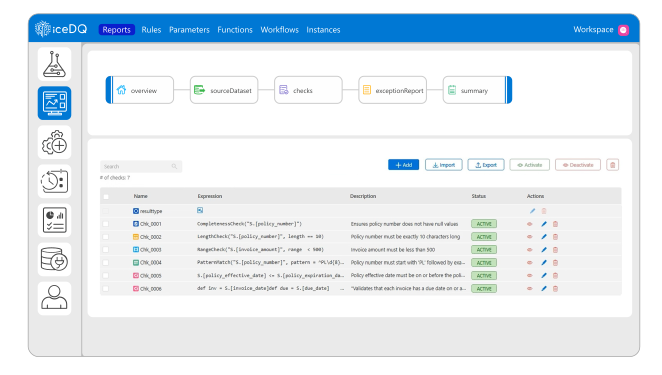
iceDQ provides a comprehensive framework for defining and executing validation rules to ensure data accuracy, consistency, and compliance across reports and data models.
- Implement business rules: Define custom business logic to validate data against organizational policies, domain rules, and expected behaviors.
- Validate report attributes: Verify key report attributes such as metadata, filters, parameters, and structural elements to ensure reports are configured correctly.
- Check format: Validate formatting rules - including data types, number formats, date formats, and display conventions - to ensure consistency across reports.
- Validate calculations: Confirm that calculated fields, KPIs, and aggregated values produce correct results by comparing them against expected logic or reference datasets.
Why teams choose iceDQ for Power BI testing

Complete BI-Layer Coverage
Automate testing across the entire BI stack - semantic models, dashboards, and reporting logic.

Embed Reports Directly
Shift left with data testing - identify defects early, long before they reach business users.

No-Code Testing
Eliminate scripting. Build and execute tests with just a few simple clicks.

Native DAX Support
Run DAX queries natively for precise validation of semantic model logic and calculations.
Automate your Power BI testing with iceDQ today
See how iceDQ can validate your reports, dashboards, and semantic models in minutes.
iceDQ vs. Manual Power BI Testing
See why automated validation with iceDQ outperforms traditional manual testing across every dimension that matters.
| Capability | iceDQ | Manual Testing |
|---|---|---|
| Semantic model validation | ✓ Automated with DAX | Manual spot checks |
| Report-to-database reconciliation | ✓ Row and column level | ✗ Impractical at scale |
| Cross-report comparison | ✓ Automated | Time-intensive |
| No-code test creation | ✓ Point-and-click | ✗ Requires scripting |
| Reusable test suites | ✓ Across environments | ✗ Rebuilt every time |
| CI/CD integration | ✓ API-first design | ✗ Not applicable |
| Audit-ready evidence | ✓ Automated reports | Manual documentation |
| Scale to 1000s of reports | ✓ Parallel execution | ✗ Not feasible |
Power BI testing with iceDQ
Ready to build on a foundation of reliable data?
Stop guessing. Start validating. See iceDQ in action.